How to note a multi use "action" rather than one time click
-
Several items in DT are currently listed as a singular one-time click to indicate that it has been done. For example, prayer, sharing a bible story, a spiritual truth, sharing the gospel itself, also inviting to an event, having a meal, sharing tea, etc. While there are one time events like "gave an injil", these others are not one-time events. The result is once one person clicks the button "prayed" or "prayer walked" no more data is being collected the next time that happens. Is there a feature or easy fix that would allow these multi-event items to be counted every time they happen and by who? For example, I have a team of 5 assigned to one contact. I need to be able to run a report at the end of the month that tells me who has been praying, blessing, sharing, inviting, attending, and how often. I could then identify trends over time. I assume it would align with their login as to who, but I have no idea how to get the multiple actions over a single action. Thanks for any help you can provide!
Susan -
Hey @Susan,
Great question! Here are some initial thoughts.
The closest currently would be the quick actions:
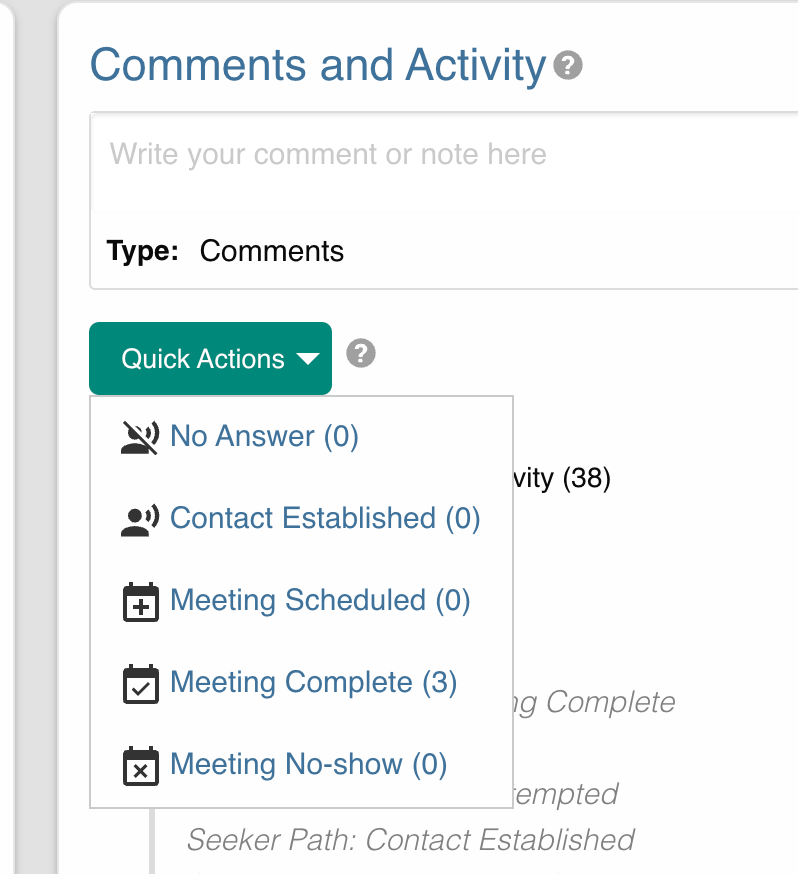
They can be clicked multiple times and keep and keep a count:
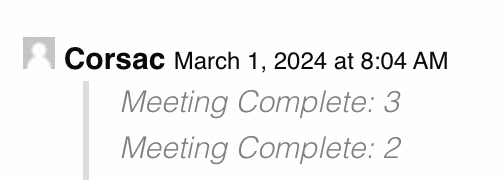
More quick actions can be added in WP Admin > Settings (D.T) > Custom Lists > Quick Actions.
2 other possible paths:
- The share app, a user can track when and where they share: https://disciple.tools/plugins/share-app/
- The lead lag plugin. Send an email to each user each week asking them to fill out a form which populates "report" records. This one is a bit more complex to set up. https://disciple.tools/plugins/survey-collection/
- building a "count" field that acts like the quick actions.

Hello! It looks like you're interested in this conversation, but you don't have an account yet.
Getting fed up of having to scroll through the same posts each visit? When you register for an account, you'll always come back to exactly where you were before, and choose to be notified of new replies (either via email, or push notification). You'll also be able to save bookmarks and upvote posts to show your appreciation to other community members.
With your input, this post could be even better 💗
Register Login